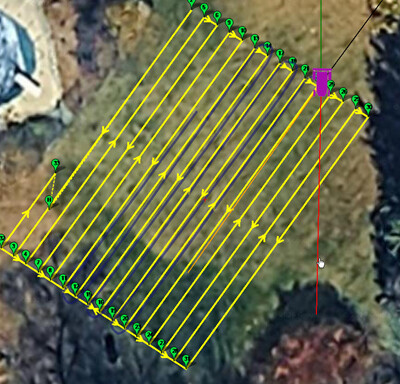
I’m fairly happy with the control I’m seeing so far using a triangular test drive (no image) and a sample survey run (image attached). That said, I’m running into some overshoot issues that I’d like input on.
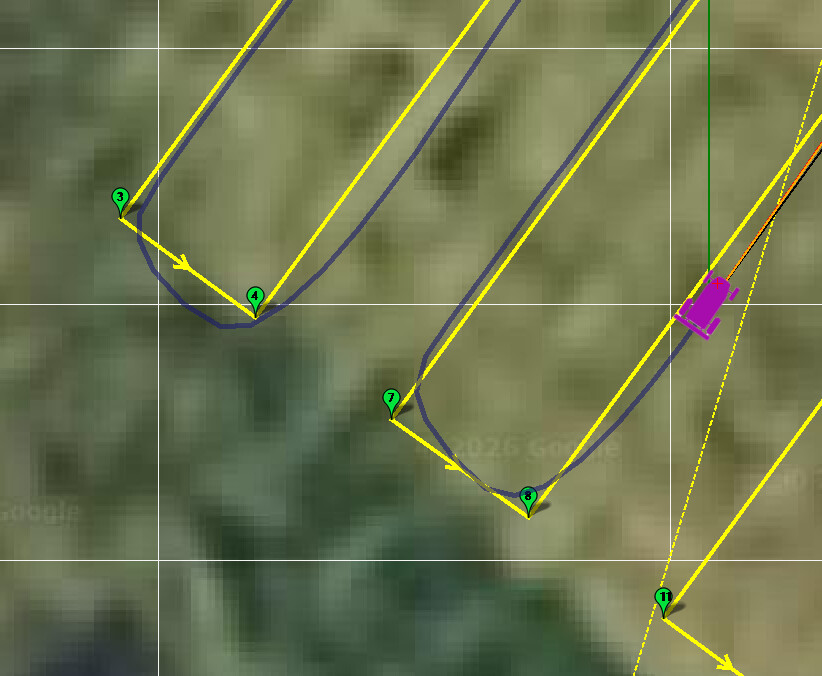
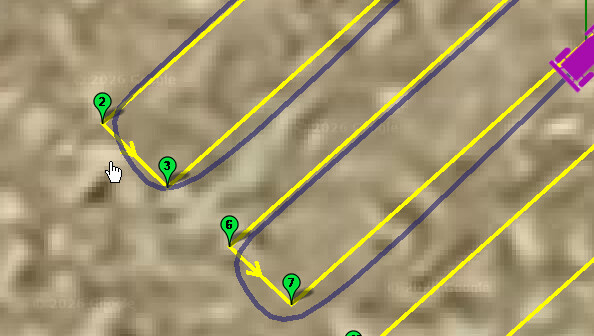
What’s happening is the rover is leaving a waypoint without being properly aligned to the next one. Because of that, it ends up taking a wide arc to get back on track, and by the time it reaches the next waypoint, it’s still correcting instead of tracking cleanly along the planned path.
Ideally, I’d like it to correct faster and stay much closer to the intended trajectory between waypoints.
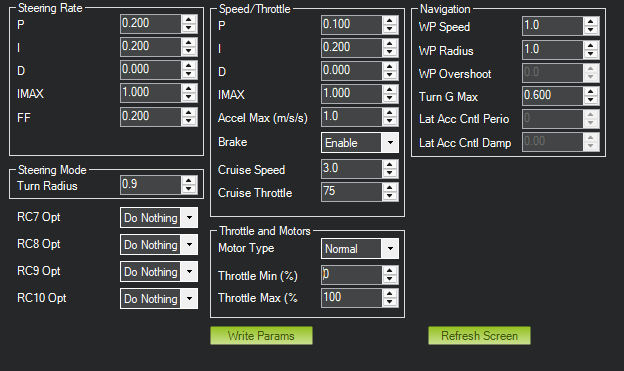
What parameters should I be focusing on to improve alignment and path tracking?
I’ve considered adding a delay at the waypoint to let it settle and lock in its heading before moving on, or even inserting a secondary waypoint right after the turn to force a straighter exit but both of those feel more like band-aids than real solutions.
I’m going back and forth on whether I prefer smooth transitions between lines (like in the image), which would require 2–3 headland loops around each obstacle to allow room for waypoint overshoot or slowing down significantly when approaching a waypoint and performing a zero-turn directly at the waypoint.
Would really appreciate any guidance. Hope everyone’s having a great week!
welcome. If you’ve got an onboard log then we can give better advice but I’d recommend not using pivot turns and instead allow the vehicle to turn sharply at each corner using SCurves
It will cut the corners slightly but I’d recommend increasing the WP_RADIUS and reduce the acceleration. More details on SCurves are here.
Additionally, reduce TURN_MAX_G and potentially TURN_RADIUS. You can get away with pretty ridiculously low values on a skid steered machine to nearly approximate pivots without incurring the overhead of the pivot controller.
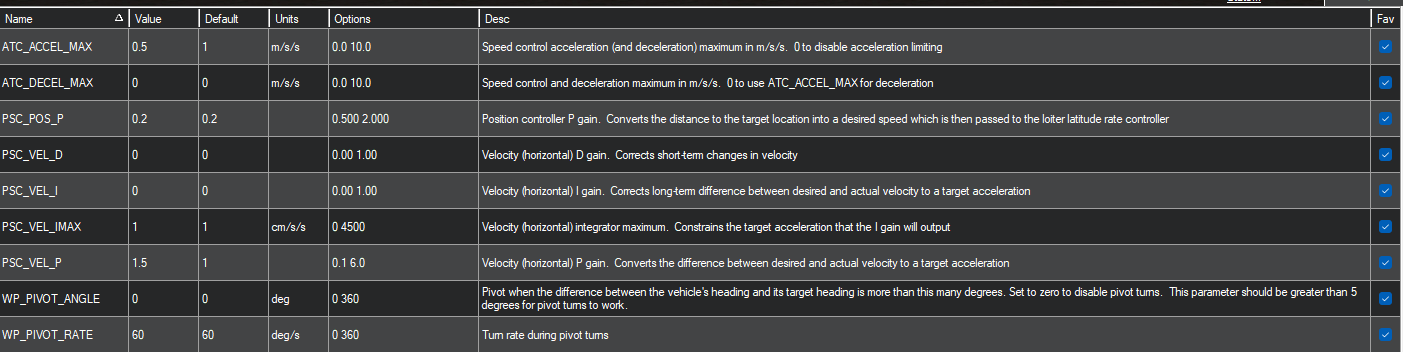
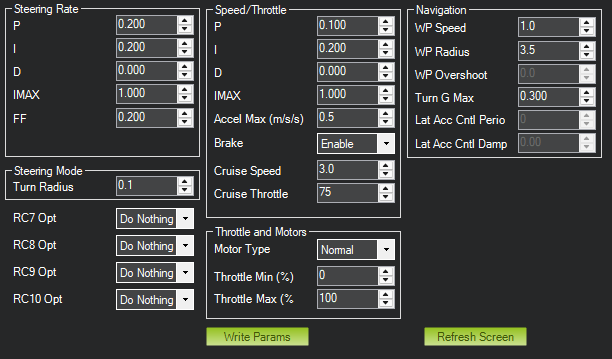
Hi @rmackay9, thank you for the fast response. In the attached image I have increased the WP_Radius to 1.5 and turned the Accel Max down to 0.5. I was playing with some of the PSC parameters related to the SCurves but it resulted in the rover overshooting the waypoint, then backing up before making the turn. I am going to play with it some more so I get better educated prior to asking for help.
Thank you for the document as well, really appreciated. I hope you have a nice weekend!
Nice to speak to you, I have watched all your YouTube videos prior to starting this venture, your setup and control on your property is really amazing. Thank you for sharing your journey with us.
I had made these Turn_Max-G and Turn_Radius adjustments as well and am seeing a similar path still. I am going to dive into this over the weekend. I’ll report back once I am better educated on the SCurves recommended by @rmackay9. Have a nice weekend Yuri!
Again thank you for the input @Yuri_Rage and @rmackay9. I was hoping to get a better understanding of the system and spend some time dialing things in, but I think I may have actually made things worse. No matter what I adjust, I can’t seem to get the rover to stay tight to the planned line when exiting a curve (see attached path image). The only workaround that has helped is adding an extra waypoint about 2 meters into the straightaway after the curve, which forces the rover to tighten up that second turn.
Regarding my plan, is there a minimum grid spacing I should be considering? I’m currently at 1.25 m, and I’m wondering if that might be too tight given my parameters and the way SCurves behave. In real mowing, I naturally end up doing k turns in certain areas, or running continuous headland loops depending on the shape of the yard. I’m starting to wonder if I’m asking too much of the rover by constraining it to this grid spacing.
Also, apologies for the delayed response, we had a product launch this week that pulled my attention away. Hope you both have a great weekend.
It would be good to provide a .bin log (aka onboard log) because before diving into the navigation tuning, it’s best to check that the turn rate controller is operating well.
Right now I am just trying to simulate the rover (mower) with MP prior to purchasing the hardware so unfortunately I don’t have a .bin log. Just going a step at a time as opposed to purchasing the hardware upfront.
Then you’ve probably learned all you need at this point. The simulated vehicle will have very different characteristics than anything you purchase, and it’s most certainly a case of diminishing returns to try and tune the default simulation to a specific use case at scale.
If you just want to see it behave better, double the lane width. The simulated vehicle simply can’t turn as tight as you wish.