How to use Web tools to configure drone

Hi All,

I am exploring the wonderful webtools available for the Ardupilot, it is really helpful. Just need some understanding.

First is the magfit.
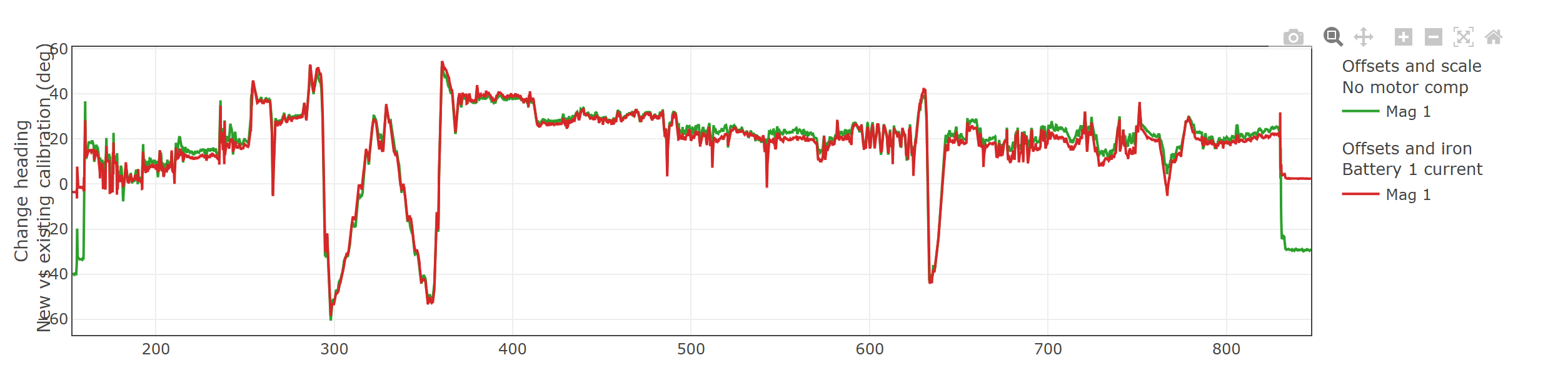
It shows the different calibration values for each flight with the same drone.
This is the flight log: https://drive.google.com/file/d/1NhJ4bgNbZMBnljXbEEQvfuXkcjHVDW_X/view?usp=sharing
My understanding of the tool is:
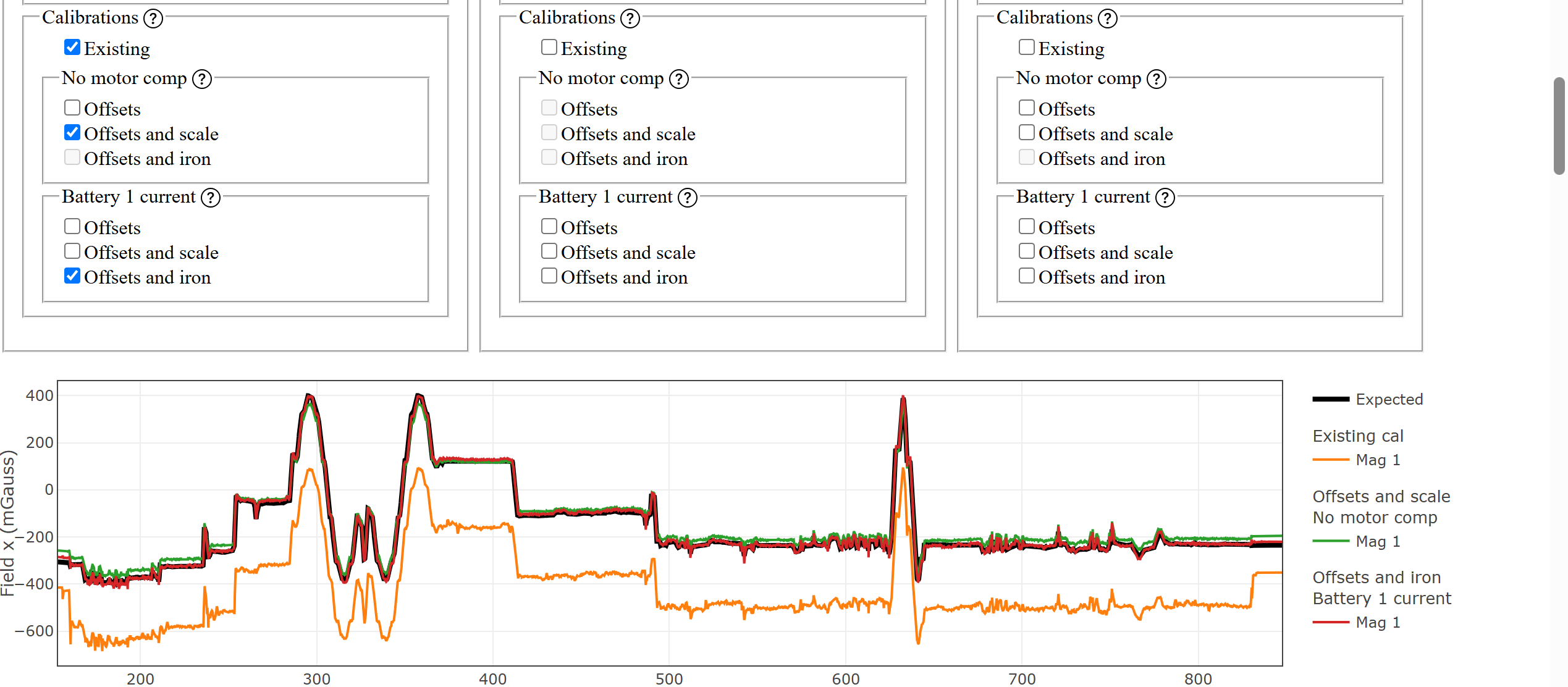

For the Mag X field, without motor compensation also works well.
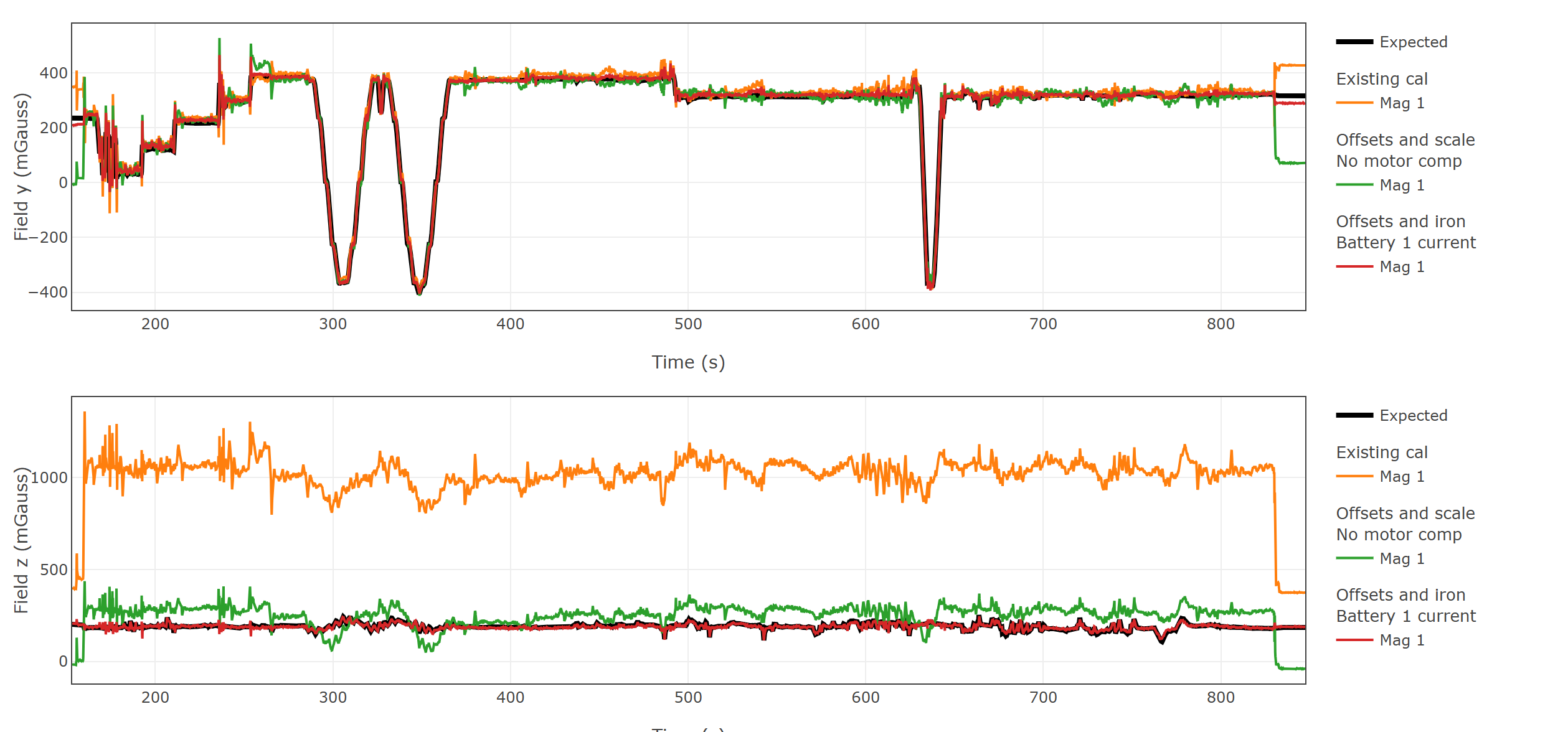

Y field also matches fine, Motor compensation will be good and need while Z-field calibration.
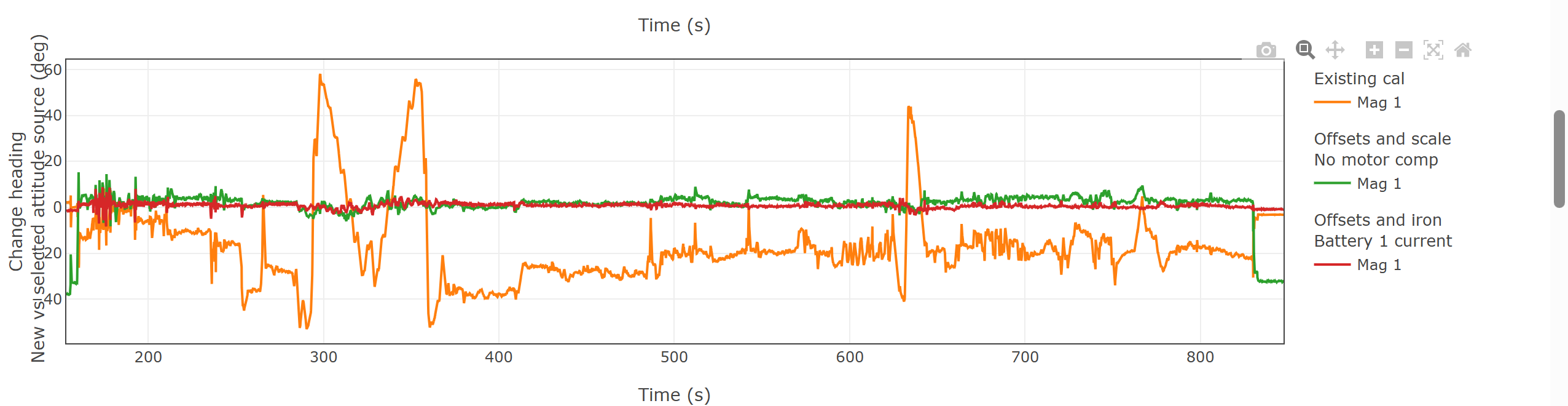

There is deviation of up to 40 degree in the compass heading with the actual heading and If I save the Offset and Iron with battery current then that would be the best possible compass calibration for me.

If anybody can check the above logs and tell me if I am right or not? because my understanding says that there is a huge magnetic field deviation and I might have some interference problem. If somebody can please tell me that the calibration with magfit will good enough for me or not? so that I will try to change the compass location to some other place (currently that is the maximum I can keep).
I just want to know whether it will safe to fly with the magfit calibration or not.

I noticed one more thing, the different flight shows me different calibration output.
I need to only check the heading errors right? it should be as low as possible once I calibrate the compass and fly?
Second I am exploring the PID webtool also, I just want to know, whether is there any possibility to estimate the PID values for the drone using the log analysis with that tools? I know it is a whole different subject. But I just want to learn whether there is any possibility to estimate the PID values by analysis the logs or not.
If anyone can explain me with the above logs example, then it would really be helpful for me.

Thanks! hope I get really amazing and good response.
Hi

Can anyone help me in this? having few issues in making the drone stable:

  1. It drifts fast in the Althold hover (having problem in Motor leveling and calibration?
  2. How to make sure that PIDs are working fine?
  3. Facing issue in back side motors (as they runs faster when the drone moves)
  4. Compass calibration
  5. Adding new failsafe
  6. GPS performance

Please guide me on these using available tools. Looking forward to hearing back from the experts.

Thanks

You have yaw imbalance issues and these are fully discussed on this forum and answers and solutions are public.

Regarding the correct and optimal configuration sequence steps, use the ArduPilot methodic configurator software, connect your drone via an USB cable and follow the documented instructions, there are even youtube videos from me explaining how to use it.

The expert ArduPilot developers took time to write documentation and produce youtube videos.

Please ask specific questions, general questions get a general answer like the one above.

Incorrectly configured vehicles do not perform optimally.

1 Like

Hi @amilcarlucas

Thanks for the wonderful guide, I have been following it for last one week and have few doubts.

Please help me to understand these things:

  1. What percentage is safe and good to keep the voltage failsafe for battery? Is it 20% or 30% and how much percentage should be always left in battery after landing to be in safer side and good practice? Generally I always fly the drone within 2km radius.
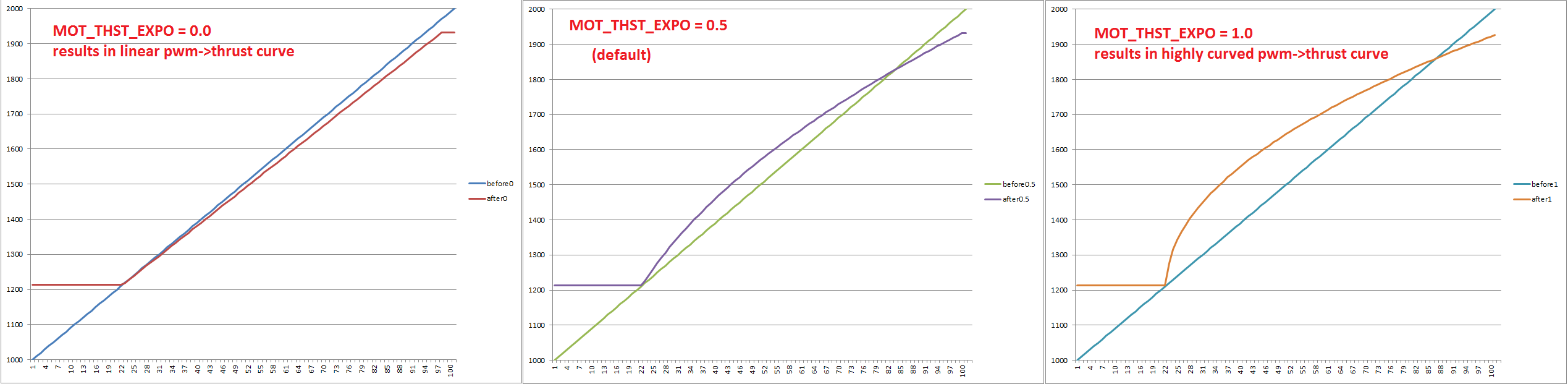
  2. How to decide the motor thrust scaling, is there any plot to take a reference for good motor thrust scaling?
  3. Vibrations below 10 during hover or at maximum performance with maximum load?
  4. What %CPU load is safe?
  5. What loop rate is good and safe?
  6. What is the good RATE.ROut and RATE.POut range for the drone while in hover and flying at maximum speed?
  7. My drone has vibration dampers attached with 1kg payload, so do I need to perform AutoTune with my payload? If so then when it makes the sudden roll and pitch then it might face the inertia of payload as well.
  8. My Yaw movements are aggressive, How can I make it smooth so more load won’t come on the motors while taking a sharp turn?

I generally face heavy wind during flight, want to put some failsafe for heavy wind so Once I do the wind estimation then How can I put the high wind failsafe?

Thanks and really appreciate if you can comment some insights and I really love your blog, it is really a wonderful and almost everything about find tuning the drone. this is what I was looking for.

Hi All,

Anyone please help me out with this?

Thanks

These questions are much much better and much more actionable. Thanks.

The percentage required to come back from 2Km away.

Just set the MAX to the battery max voltage directly after taking off.
Set the min to the very minimum voltage that the battery can operate at.

Vibrations below 20 at maximum performance with maximum load.

< 40 %

Depends on the size of the vehicle 400Hz is the default. Why you want to change it?

10%

Like explained, autotune with the minimum weight you are expected to operate at.

Tune it correctly until the end.
Once it is correctly tuned, if it does not work like expected, ask here again.

How about some patience? It took you 13 days to answer me.

1 Like

Okay, how much backup should be always there? generally what voltage failsafe you keep for your drone?

You mean that when we takeoff and whatever battery voltage it shows just after takeoff? (which will be instantly from 25.1v to 23.6v). So I will update the max to 23.6, the minimum voltage I will keep 17v.

I was actually asking for the Motor Thrust scaling graph:

To be the good scaling, the line should match as close as possible right?

Okay, and one more thing, I have kept gyro filter to 26hz for my configuration which is hexacopter and weight around 8kg. Is it okay? The claude is keeping saying it is not okay.

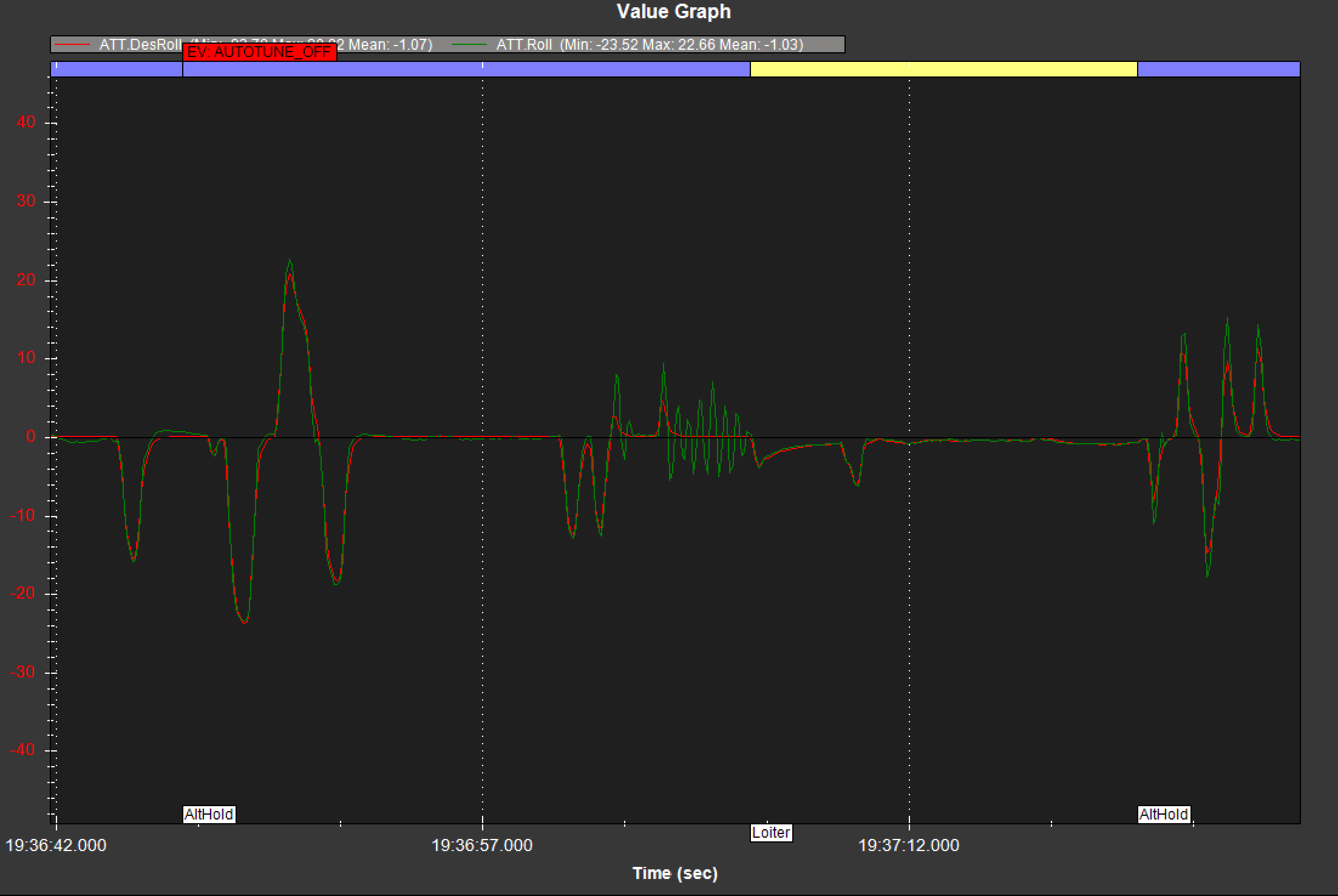
I have performed the successfully second AutoTune and I felt that my roll axis is over tuned and resulting in the oscillations.

I have also performed the wind estimation and needs your confirmation whether it went good or not, this is what I observed:

Test1:
Along the wind:
Airspeed:15.1 + 2.5
X accel: 2.5

90 degree to the wind (to the right):
Airspeed:12.1 + 1.7
Y accel: 2

180 degree to the wind (against the wind):
Airspeed: 11.5 + 3.1
X accel: 2

270 degree to the wind:
Airspeed: 13 + 3.5
Y accel: 2

Test 2:
Along the wind:
Airspeed:14.2 + 0.5
X accel: 2

90 degree to the wind:
Airspeed:10.5 + 1.7
Y accel: 1.7

180 degree to the wind:
Airspeed: 9.8 + 2.5
X accel: 1.5

270 degree to the wind:
Airspeed: 12.3 + 2.8
Y accel: 2

Here are the logs for your reference: New Test Log - Google Drive

I am really sorry, my intention was not that. I really appreciate and thankful for all the support I am getting from this forum. Your blog was so good and detailed that it took me so much time to completely understand.

Really looking forward to hearing back from you. Thank you so much

The AMC already recommends battery voltage thresholds depending on the chemistry, and it also explains that it all depends on your:

  • Current draw
  • operating temperature
  • How much energy do you need to come back home.

Please read the documentation again.
The graphs presented there are typical, you should ask your battery manufacturer for graphs on YOUR battery.

Yes, start with a fully charged and healthy battery when calculating Volt per cell max

Yes.

Do not ask claude this kinds of things!!!
Use the frequency recommended by AMC (assuming you entered your component data correctly in the component editor window) as a starting point and adjust it (if necessary) based on flight data.

Look at the PID tool to see if it is indeed over tuned.