I’ve achieved quite a bit of success this weekend. Here’s the update:
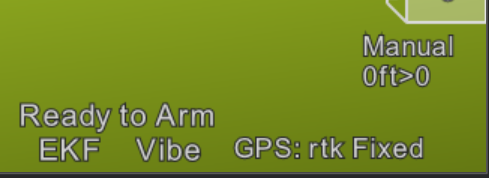
The screenshot is the result of the settings file I will attach at the bottom of this post along with a QioTek ZealotH743, Quectel LC29HEA, and a helical antenna from CUAV. I did achieve slightly better time-to-fix results using a survey grade antenna, but I did not collect any detailed data to support that observation. RTK Fixed results were repeatable between boot cycles. This was a bench test only, and I did not fly/drive with the autopilot due to time constraints.
RTCM3 from my local fixed base was injected via Mission Planner over MAVLink, successfully using both MSM4 and MSM7 correction data during separate tests.
A testing was done via Rover 4.5.3, which uses the same GPS backend and drivers as Copter and Plane. No firmware changes were required.
All tests were at 5Hz. It is demonstrably worse in almost all cases to increase the message rate to 10Hz, so I didn’t even bother.
Parameters of note:
GPS_INJECT_TO,127
GPS_RATE_MS,200
GPS_TYPE,5
SERIALx_PROTOCOL,5
SERIALx_BAUD doesn’t matter - GPS detection is auto-bauded.
Use 460k baud on the LC29HEA if you want RTCM3 to be passed through the autopilot. 230k was unreliable at best (mostly non-functional). RTCM3 over MAVLink has a high bandwidth requirement, so this is an expected outcome.
ArduPilot uses only the GGA, RMC, and VTG sentences for the basic NMEA driver. To save on bandwidth, I disabled all other NMEA output as well as the proprietary messages that are useless except while using Quectel’s software.
HDOP is the only performance metric present in the data that ArduPilot can parse, so it is unsurprising that other users have noted that metrics like horizontal and vertical accuracy go unreported in the downstream telemetry.
I was unable to achieve better than RTK Float while the module was in “drone” navigation mode. As soon as I switched it back to “normal” navigation mode, it easily achieved RTK Fixed. I’m not sure what might cause that specific behavior, but it was repeatable. So unless anyone has a concrete reason why “drone” mode is somehow better, don’t use it. I’m left wondering if whatever filtering happens in “drone” mode accounts for the position lag we saw in previous user logs. The attached file sets “normal” mode.
The recommended settings from the other forum seem to include some undocumented settings, as well as recommending some settings that the spec guide says are incompatible with the LC29HEA. However, all commands in the attached file appear to work as intended, and I commented it to the best of my ability so that you can see what’s happening on each line.
To use the attached file, rename it with a .ini extension, open QGNSS, and open the “Command Console” from the Tools menu. Click “Load” and select the .ini file. Make sure your GPS is connected, and click the Run button. QGNSS will endlessly loop through the command set until user intervention, so there’s a long delay at the end to allow you to stop the sequence before it restarts. The currently executing command is highlighted in red.
You may have to run the commands more than once if you have changed the baud rate from the default of 460800.
I found it easiest to switch both of the little selector switches toward the antenna connector while using the USB connection to QGNSS, and then switch them both back toward the USB-C connector while using the autopilot.
LC29HEA_ArduPilot.txt (6.1 KB)