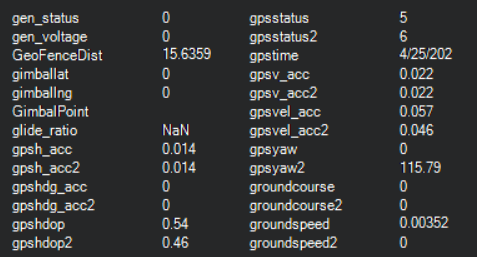
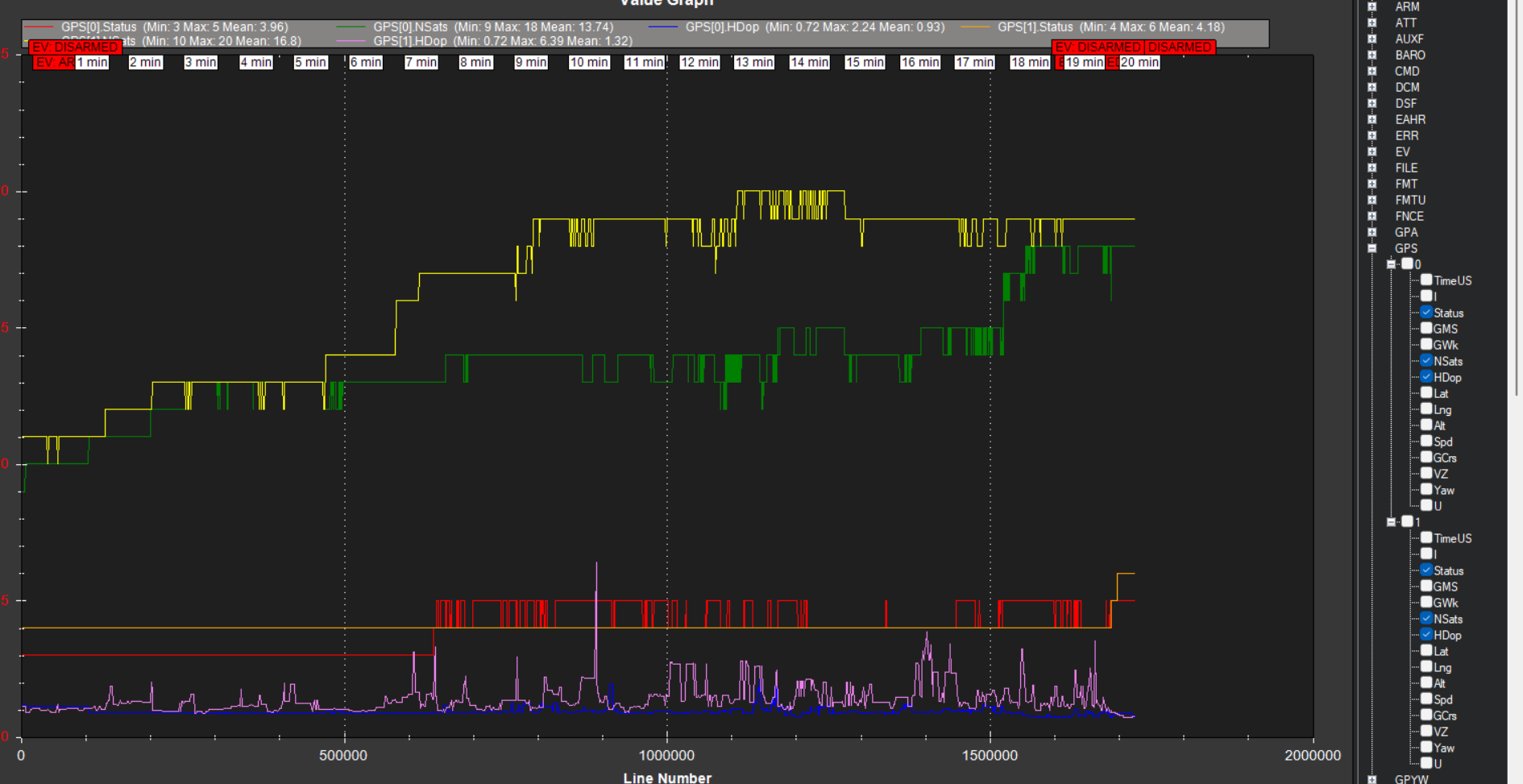
Log analysis overlay between the 2 radios
Why the delta? Is this to be expected? (oh, and now is RTK Fixed in the time between screen print and typing this - so frustrating!
Ok, gonna get some mowing done (with supervision)… Any thoughts appreciated!
You are probably chasing ghosts by analyzing the data this way. (and I removed the rest of this paragraph because…see the next one!)
Also, if you are testing near a building or trees, don’t. Doing so pretty much negates any results you’re seeing or any advice I can give. Get away from stuff. Test in the open. EDIT: I downloaded your newest log (I’m not going to sift through 10 of them). Sitting right next to (or inside!) a metal building will almost certainly cause issues…
Remember, also, GPS1 (the moving base) takes corrections from the external RTCM3 source. GPS2 (the rover) takes its corrections directly from GPS1.
I am not sure I can add much here, but I will offer up my thoughts. With GPS2 showing RTK fixed when the RTCM3 is disconnected or turned off, that is exactly what it should be showing. With the correction signal turned on from the base station it seems like GPS1 is not not getting the external correction reliably. Maybe check out the antenna wire to the base station antenna or connect a temporary antenna to the base station GPS card. The antenna and wire does see some weather. At least unscrew it and screw it back in. Everything needs to be out so it has a clear view of the sky. Make sure GPS+AUTO_CONFIG is set to 1 so it will take care of proper GPS configurations for the Moving Base (GPS1 and the Rover (GPS2).
50’ from interference sources should be enough. The logs seem to show an uneven track that would indicate an indoors test.
What is the correction source, and how is it transmitted?
1 Like
marblecreek
(Rover; AP 4.6.0-BETA, Pixhawk 6X CM4)
189
Hey y’all - thanks for the help. I ran the mower pretty far from things this morning. For quite some time GPS(1) was RTK Float, then Fixed. You may be on to something with the distance. It’s just weird that I’ve had RTK Fixed since I got gpsyaw working - from the same location.
That said, today was better.
Corrections are from a local NTRIP caster - 14km away (closest, but has worked fine) AUS_LOFT_GNSS. I’ve been thinking about spinning up a base station and casting myself. We’ve just had a city sewer line cross the property with some fresh pins - should be light work to get a location surveyed in. Our internet is pretty crowded with camera traffic, but reliably over 500k download speed.
I’m out for a week, may take a couple of days off for some quality time with the mower when back. Anything y’all can point me to, pls advise!
Cd…
marblecreek
(Rover; AP 4.6.0-BETA, Pixhawk 6X CM4)
190
Interesting - so, wouldnt GPS2 then have a lower accuracy - if based on GPS(1), that’s say, DGPS, wouldn’t GPS2 fall in line?
I’ll have to dig a bit and understand the correction process configuration…cd
Those corrections are to make the rover module’s location perfectly relative to the moving base so that we can derive heading (weirdly termed yaw in this ecosystem). GPS fix state is only part of what determines overall accuracy and precision. With the moving base so close to the rover, the corrections arriving reliably, and the constellation geometry essentially identical, the rover GPS to is able to resolve its RELATIVE position with low ambiguity, thus you see RTK Fixed on GPS2, even when GPS1 is wandering all over (and GPS2 wanders right along with it).
The only thing that matters for global (earth referenced) accuracy is GPS1 and the external RTCM3 source.
Your local caster looks like its outputting reasonable MSM4 data at 1Hz. Your satellite reception, however, is pretty bad. With all constellations active, you should be seeing satellite counts in the mid to high 20s. You can try using GPS1_GNSS_MODE,5 and GPS2_GNSS_MODE,5, which limits the constellations to GPS and Galileo, which should be reasonable for your location. I don’t think that’s going to solve the issue, but it’s not going to hurt.
A wild guess, but maybe that flasher right next to your antennas is causing HF interference.
If you want to try out a new GPS board and antenna, I could loan you one. Just let me know.
1 Like
marblecreek
(Rover; AP 4.6.0-BETA, Pixhawk 6X CM4)
193
Hi Steve - I have a “spare “ gps board to Easter egg this problem, but thanks so much for the offer. I’ll likely need some coaching setting up a base station tho. Will use this board for testing, then the base.
I’m sure Mother Nature is keeping you busy these days - have watched the weather up your way!
I am starting to wonder if you have outside interference from some other sources.
If you want to build the base station to send the correction straight to your mower it is very easy. Either through Mavlink or independent radio connection. If you want to go the NTRIP route and provide your correction to others, it is a little harder. I have never built an NTRIP base station, but I have been thinking about building one. I know @Yuri_Rage has a procedure for building them. He talked about it in the 2024 MowStock post. I know it takes a micro computer to connect to the internet.