Has anyone tried connecting mavproxy to a flight controller inside Windows WSL via H12 Pro?
The reason is that there are some Linux Python libraries not available in Windows OS and interfacing with the Windows libraries is not that straightforward.
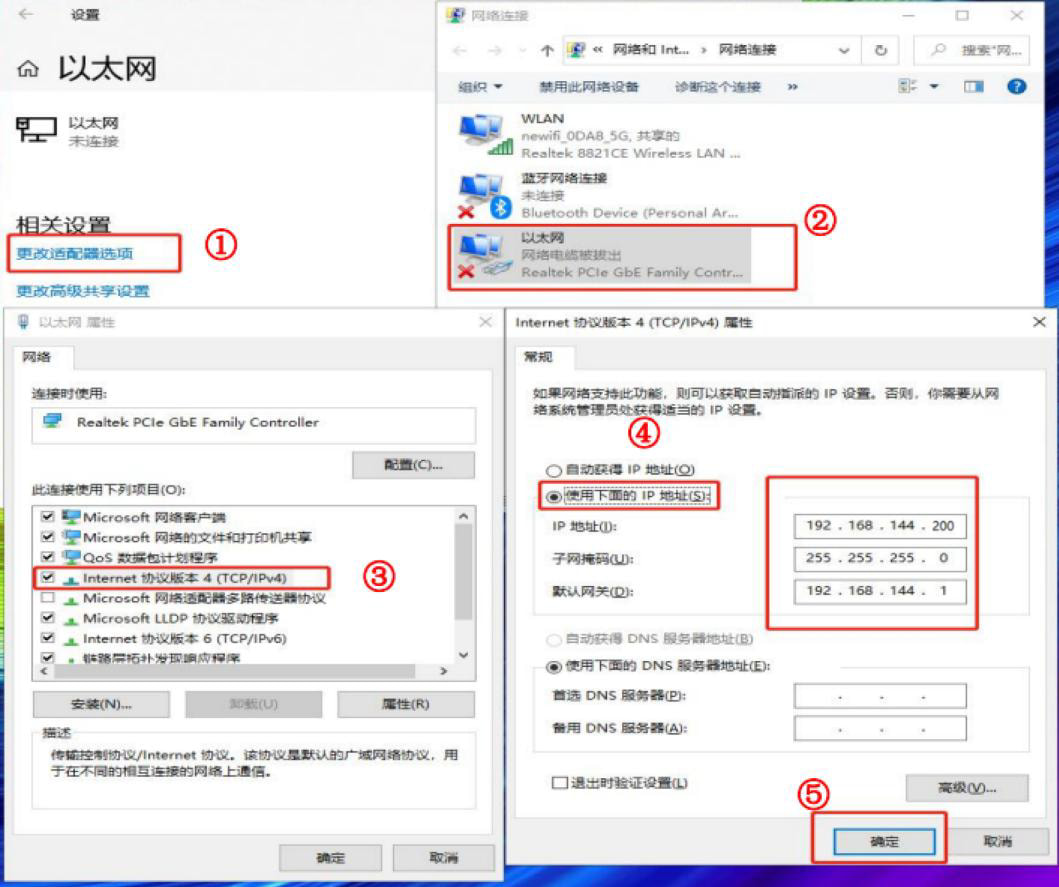
# H12 Pro configuration on Windows OS
Ethernet adapter USB-to-Ethernet:

   Connection-specific DNS Suffix  . :
   Description . . . . . . . . . . . : Realtek USB GbE Family Controller
   Physical Address. . . . . . . . . : 0C-37-96-B3-02-2E
   DHCP Enabled. . . . . . . . . . . : No
   Autoconfiguration Enabled . . . . : Yes
   Link-local IPv6 Address . . . . . : fe80::deba:7de3:5b40:3352%12(Preferred)
   IPv4 Address. . . . . . . . . . . : 192.168.144.200(Preferred)
   Subnet Mask . . . . . . . . . . . : 255.255.255.0
   Default Gateway . . . . . . . . . : 192.168.144.1
   DHCPv6 IAID . . . . . . . . . . . : 638334870
   DHCPv6 Client DUID. . . . . . . . : 00-01-00-01-30-52-5F-33-B0-47-E9-FD-18-12
   DNS Servers . . . . . . . . . . . : fec0:0:0:ffff::1%1
                                       fec0:0:0:ffff::2%1
                                       fec0:0:0:ffff::3%1
   NetBIOS over Tcpip. . . . . . . . : Enabled
# Windows Mavproxy connection
1 links
0: 127.0.0.1:14550
LOITER>
## inside WSL
$ mavproxy.py --master=udpout:127.0.0.1:14550
Connect udpout:127.0.0.1:14550 source_system=255
Log Directory:
Telemetry log: mav.tlog
Waiting for heartbeat from 127.0.0.1:14550
MAV> link 1 down

$ mavproxy.py --master=udp:127.0.0.1:14550
Connect udp:127.0.0.1:14550 source_system=255
Log Directory:
Telemetry log: mav.tlog
Waiting for heartbeat from 127.0.0.1:14550
MAV> link 1 down

~$ ip route show | grep -i default | awk '{ print $3}'
192.168.144.1

~$ ifconfig -a
eth0: flags=4163<UP,BROADCAST,RUNNING,MULTICAST>  mtu 1500
        inet 192.168.144.200  netmask 255.255.255.0  broadcast 192.168.144.255
        inet6 fe80::deba:7de3:5b40:3352  prefixlen 64  scopeid 0x20<link>
        ether 0c:37:96:b3:02:2e  txqueuelen 1000  (Ethernet)
        RX packets 22  bytes 1930 (1.9 KB)
        RX errors 0  dropped 0  overruns 0  frame 0
        TX packets 13  bytes 738 (738.0 B)
        TX errors 0  dropped 0 overruns 0  carrier 0  collisions 0

eth1: flags=4098<BROADCAST,MULTICAST>  mtu 1500
        ether b0:47:e9:fd:18:12  txqueuelen 1000  (Ethernet)
        RX packets 334  bytes 35234 (35.2 KB)
        RX errors 0  dropped 0  overruns 0  frame 0
        TX packets 186  bytes 16354 (16.3 KB)
        TX errors 0  dropped 0 overruns 0  carrier 0  collisions 0

lo: flags=73<UP,LOOPBACK,RUNNING>  mtu 65536
        inet 127.0.0.1  netmask 255.0.0.0
        inet6 ::1  prefixlen 128  scopeid 0x10<host>
        loop  txqueuelen 1000  (Local Loopback)
        RX packets 46  bytes 6096 (6.0 KB)
        RX errors 0  dropped 0  overruns 0  frame 0
        TX packets 46  bytes 6096 (6.0 KB)
        TX errors 0  dropped 0 overruns 0  carrier 0  collisions 0

loopback0: flags=4163<UP,BROADCAST,RUNNING,MULTICAST>  mtu 1500
        ether 00:15:5d:7b:f2:2c  txqueuelen 1000  (Ethernet)
        RX packets 8  bytes 436 (436.0 B)
        RX errors 0  dropped 0  overruns 0  frame 0
        TX packets 0  bytes 0 (0.0 B)
        TX errors 0  dropped 0 overruns 0  carrier 0  collisions 0