Hi everyone,
First of all, am I right in General or should I post in another category?
I’m having trouble with my Matek F405-TE FC. I’m using ArduDeck.
The FC hangs on startup with the critical error: CRIT Config Error: Too many backends.
This issue started after I flashed a new firmware to try and fix a compass detection problem. Before this, the GPS unit (HGLRC M100-5883, linked below) was working correctly for GPS positioning, but the integrated compass was never detected by ArduPilot (neither in ArduPlane 4.7.2/4.7.0 nor ArduCopter 4.7.0).
Hardware Setup:
- FC: Matek F405-TE
- GPS/Compass: HGLRC M100-5883 (M10 GPS + QMC5883L Compass) Link
- Wiring:
- GPS Data: TX4/RX4 on FC.
- Compass I2C: SCL to FC SCL, SDA to FC SDA.
Steps Taken:
- Tried to flash VTOL (ArduPlane) 4.7.2 and ArduCopter 4.7.0. ArduDeck reports “Flash successful”.
- Tried flashing with and without an SD card inserted.
- Attempted to enter Bootloader mode by holding the Boot button while powering on, ArduDeck doesn’t recognice a board, the red LED is on and the blue is slightly on.
- I already heard often about problems with the compass, so probably not my bad?
Hope I didn’t forget important logs etc.
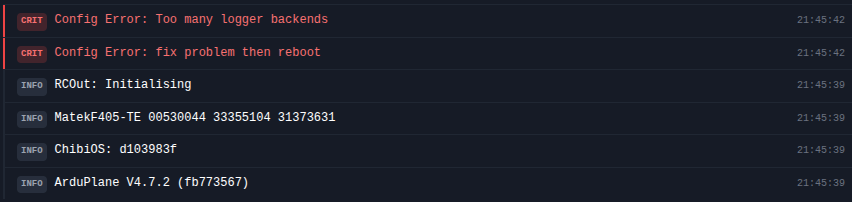
Thank you for any help in advance!