Hello, I have experimented with two different rangefinder. I now currently have TF mini S which is working as rangefinder one facing down. I also have a TF mini cereal facing forward, which is working. I’m using the CV 0850 optical sensor which does show XNY values. I’ve tried various methods to trigger the calibration, one using a physical switch and the other using LUA through a script. My no method can I get a message back saying calibration has started or any of the corresponding numbers I have tried the calibration starting at 10 feet above ground toggling the calibration switch all the way up to 50 feet above ground. I have a score of 245 at all times on the sensor and I’m going to attempt to put a LUA script that will message me the score at the time. I’m doing the calibration test to confirm that I am above 10, which is what my settings are. Can anybody think of a reason why PIXHAWK6C with 4.7.2 would not be responding to the calibration. In the past when I have attempted similar methods such as auto tune, etc. everything worked correctly, even from LUA.
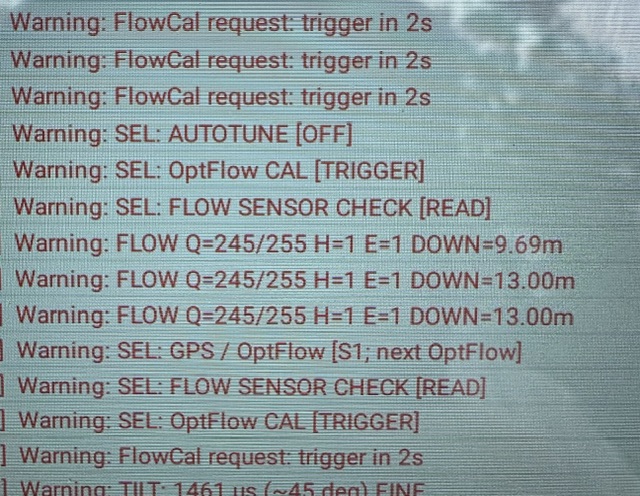
I created a script that lets me first check the quality score then show me the distance sensor value which confirms I do have a valid quality and a valid height and then when I press the button to do the trigger for the calibration, there is no response. My call to do the trigger sends me back a message that the center is about to be sent in two seconds that way I’m not sending messages back talking over the messages that may come back from the calibration. I’ve tried this with physical buttons and still get no messages. I am in loiter flying in GPS
Update. I just made a discovery which is connected to Mission planner sitting on my bench I can flip the switch and start seeing all the flow cow parameters, such as flow Cal started, and then percentage value showing up all of which or zero. The assumption I’ve been making is is that I should see these messages coming back on my remote control where I see all other typical messages, but in fact, they are not showing up on my remote control so perhaps this thing has been working the whole time.
Hi @Tchap,
So you’re saying that the orientation shown here on the ArduPilot wiki is incorrect?
If you could do a test flight at some point and provide an onboard log that will help us ensure that you’re correct and we can fixup the wiki.
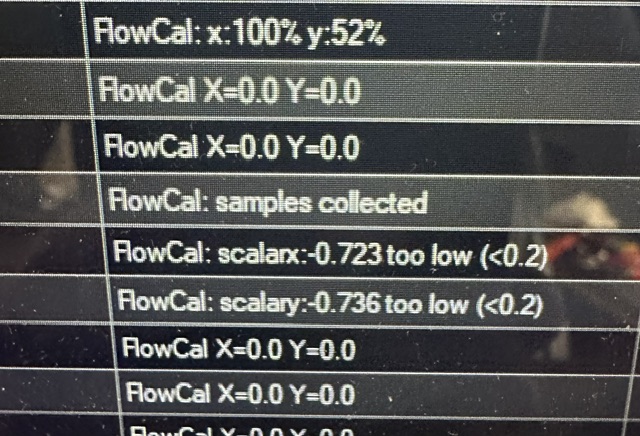
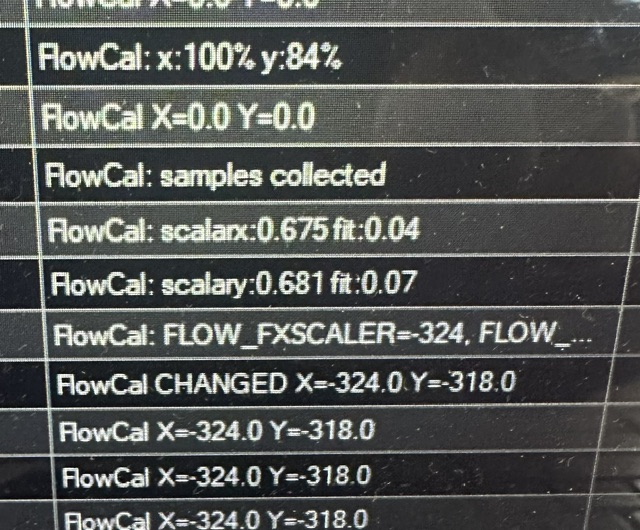
It’s strange the way that is worded and drawn because it clearly says that the foot of the board goes to the rear of the drone for Ardu. I tested it that way and it rejected the results saying that both X Y were negative and you could not have a value below .2 positive. I simply reversed the orientation in the optical flow settings and changed it to 18,000 then retested and the score was approved and written. Multiple test flights have been very pleasing using a button to switch from GPS to optical at a height that I want to land from manually and the button also reduces speed for landing and it is working out perfectly. The script also puts the decent speed back to normal if I raise the drone back up above 5 m in case I’m going to land in that mode and then I decide to takeoff again the script put EKF back to GPS and landing speed back to normal. Multiple test have been very satisfactory because I have some type of GPS glitch landing on asphalt in my driveway typically when it gets down within 2 feet or so there is a risk.
To be clear the orientation of my CV 0850 has the lidar towards the front of the drone, which is my interpretation of the drawing you have. That orientation does not work.
Another observation I have made on PIXHAWK6C is that in fact, the optical X and Y do work perfectly using FMUDebug port for cereal. However, the rangefinder will not work on that same port. I switched TF mini – S to the FMU debug port and it works perfectly there for rangefinder.
If that helps, I’ve always checked optical flow orientation settings connecting on MP (no need to arm), moving vehicle NS and EW, and checking if movements on MP appear NS and EW the same way.
Indoors without GPS, defining virtually EKF origin on a well known place, moved distances can be checked. Indoor missions are possible with optical flow (here with an helicopter).